
Troubleshooting
The fastest way to debug a block is the “Runtime diagnostics” + Simulator in the Target tab. This page covers reading them and a standard checklist for “block published but not showing on storefront”.
Diagnostic panel
Section titled “Diagnostic panel”The diagnostic panel sits in the Target tab StickyBar and tells you exactly which rule is hiding the block.
Subtitle: “Based on Simulator preview, not actual storefront data.”
What each verdict means
Section titled “What each verdict means”| Verdict | Meaning | Fix direction |
|---|---|---|
| Visible | All good | — |
| Page type mismatch: this block targets {expected} pages, visitor is on {got}. | Block mount page ≠ visitor page | Check Placement and Pages settings, or adjust the Simulator URL |
| Blocked by display rule | A visibility rule didn’t match | Switch through the 8 visibility dimensions and check each in the Simulator |
| No available placement on this page | The theme has no available anchor on this page | Switch theme, switch placement, or use Custom Position |
| Page rule no match | The Pages rule filtered this page out | Add the current page type to the Include list |
| Visitor login state doesn’t match | The Customers rule filtered this visitor out | Adjust the Login state setting |
| Placement not set | The Placement field is missing | Pick a mount location |
| Invalid CSS selector | The Hide theme elements field (Pro) has a bad selector | Fix the CSS selector syntax |
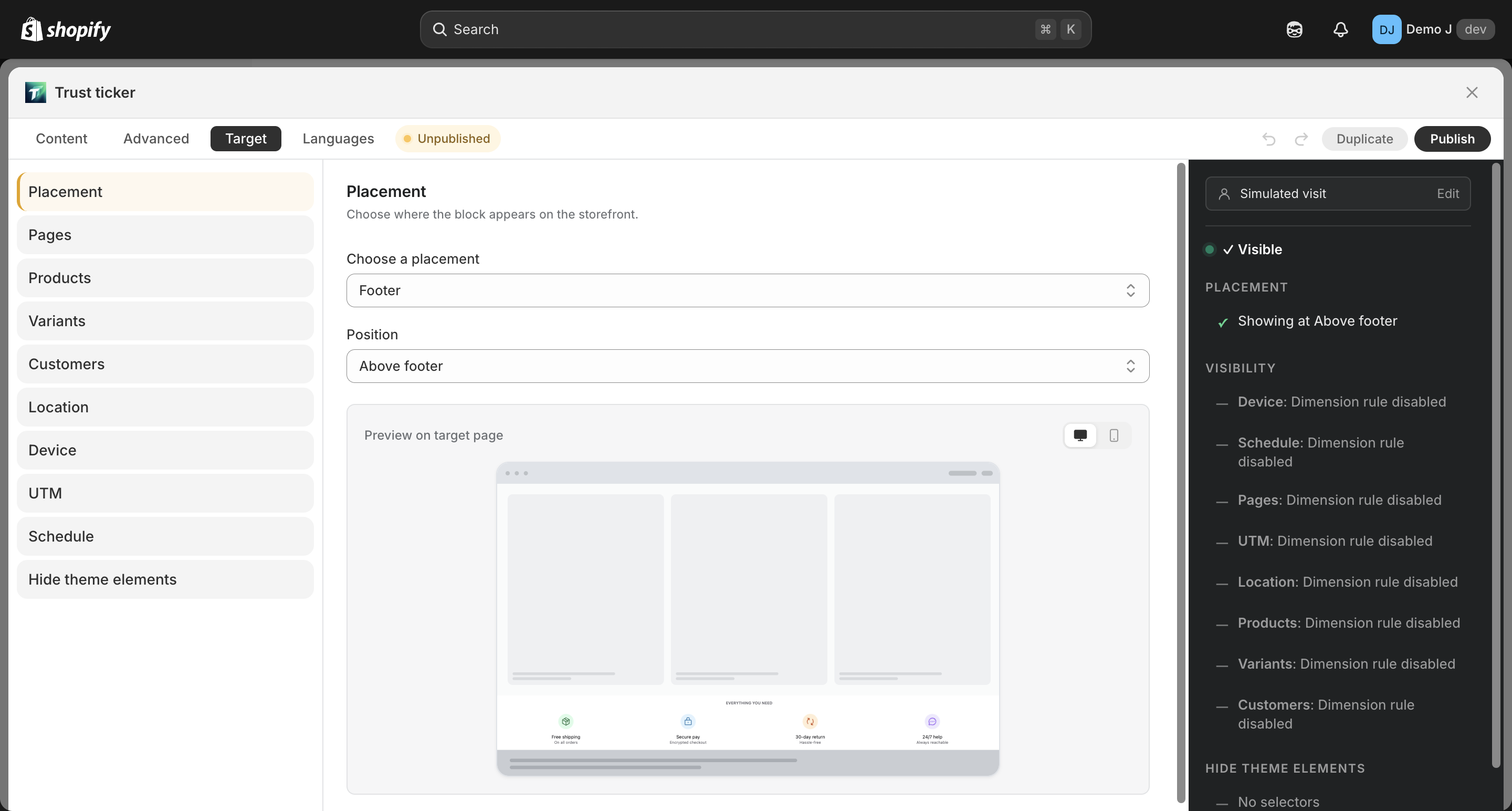
When more than one rule fails, the panel lists every failing rule at once so you can fix them in one pass instead of one-by-one.
Simulator
Section titled “Simulator”In the Target tab right sidebar, fill in a virtual customer profile to see how rules react:
- URL — auto-parses page type + UTM
- Device / Login state / Country (segmented control)
- Customer tags / Total spent / Order count (input)
Switching the persona updates the verdict in real time without affecting what you save.
Checklist: block is published but doesn’t show on the storefront
Section titled “Checklist: block is published but doesn’t show on the storefront”Run through these in order:
1. Is the app embed enabled?
Section titled “1. Is the app embed enabled?”Go to Block list → StatsRow → “App status” card:
- “Active” — good
- “Inactive” — click “Activate” to jump to the theme editor
- ⚠️ “Switching themes resets this toggle — re-enable after changing themes.”
2. Check the diagnostic panel
Section titled “2. Check the diagnostic panel”Open the block editor → Target tab → top StickyBar or diagnostic button → see which rule is failing and use the table above.
3. Verify with Simulator
Section titled “3. Verify with Simulator”In the Simulator sidebar, paste a real link (with UTM params, etc.) and check the verdict.
4. Custom Position scenarios
Section titled “4. Custom Position scenarios”If you’re using Custom Position:
- Confirm the Tantou block was added in the theme editor with the correct block ID pasted in
- Confirm the theme is saved
- Confirm the block is on a published template (not a draft)
5. Contact support
Section titled “5. Contact support”Email with:
- Block ID (use the “Copy ID” button on the block list card)
- Storefront URL
- Browser and OS
- A screenshot of the storefront page where it’s missing
- What you expected vs what you see
Common errors
Section titled “Common errors””Save failed” / “Block too large”
Section titled “”Save failed” / “Block too large””The block exceeds the 96 KiB size cap.
- Check for very long Custom CSS or many duplicated components
- Split into multiple blocks — visibility rules can give you the same effect
”Free quota used up”
Section titled “”Free quota used up””A field exceeds the demo quota for Free shops (products / variants etc.).
- Reduce the number of items, or upgrade to Pro
- See Plans and pricing
”Cross-type switch not allowed”
Section titled “”Cross-type switch not allowed””A label-type block can’t be changed to a non-label block, and vice versa (see Block types).
- To change type, create a new block.